Vertical video has quietly become the most powerful content format on the internet. From YouTube Shorts to Instagram Reels and TikTok, audiences now expect stories to fit their phone screens naturally. With Google Veo 3.1, Google has taken a meaningful step forward by allowing creators to generate vertical videos directly from images, while also improving visual consistency—one of the biggest weaknesses of earlier AI video tools.
This update isn’t just a small feature tweak. It signals how seriously Google is taking mobile-first AI video creation. In this article, we’ll explore what Veo 3.1 actually does, why it matters, where it still falls short, and how creators can use it responsibly without falling into hype or scams.
What Is Google Veo 3.1?
Google Veo 3.1 is the latest version of Google’s advanced AI video generation model, developed under the Gemini ecosystem. It can generate videos using text prompts, reference images, or a combination of both.
What makes Veo 3.1 different from previous versions is its ability to:
- Generate native vertical (9:16) videos
- Maintain better consistency in characters, objects, and scenes
- Produce higher-quality output suitable for modern social platforms
Instead of forcing creators to crop or re-edit horizontal videos, Veo 3.1 now creates content exactly in the format platforms prefer.
Why Vertical Video Support Is a Big Deal
Vertical video isn’t a trend anymore—it’s the default.
Most people discover content on their phones. When a video fits the screen perfectly, it feels immersive. When it doesn’t, viewers scroll away. Earlier AI tools often ignored this reality, generating widescreen clips that needed extra editing.
With Veo 3.1:
- Creators save time
- Video quality stays intact
- Content feels native to Shorts, Reels, and TikTok
This single change alone makes Veo 3.1 far more practical for real-world use.
How Image-to-Video Works in Veo 3.1
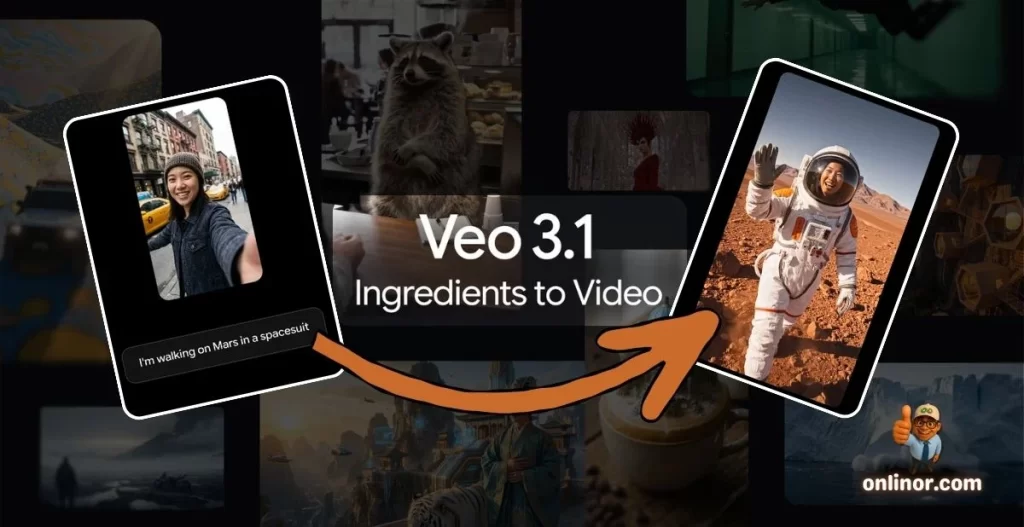
One of the most powerful additions in Veo 3.1 is its image-based video generation workflow, sometimes described as “ingredients to video.”
Simple Workflow
- Upload one or more reference images
- Select vertical video output (9:16)
- Add a short descriptive prompt (optional but recommended)
- Generate a short animated video
- Upscale to higher resolution if needed
The AI uses your images as visual anchors, which helps it keep faces, objects, and environments consistent throughout the video.
Improved Consistency: What Actually Changed?
Earlier AI video tools often struggled with:
- Changing facial features
- Shifting colors
- Objects appearing and disappearing
Veo 3.1 improves this by treating reference images as fixed visual rules, not loose inspiration. The result is smoother motion, fewer sudden changes, and a more believable sequence overall.
This matters a lot for:
- Brand videos
- Product demos
- Educational visuals
- Story-driven short clips
Resolution and Quality Improvements
Veo 3.1 also supports higher-quality output, including options for:
- 1080p video
- Upscaling to 4K in supported environments
This makes the generated videos usable not just for social media, but also for:
- Editing timelines
- Presentations
- Professional workflows
While AI video still can’t fully replace traditional filming, the quality gap is narrowing quickly.
Where You Can Use Google Veo 3.1
Google is integrating Veo 3.1 across its ecosystem, including:
- Gemini app
- YouTube Shorts tools
- Google Vids
- Flow
- Vertex AI
- Gemini API (for developers)
This means Veo isn’t locked into a single experimental product—it’s becoming part of Google’s long-term creative infrastructure.
Positive Sides: What Veo 3.1 Does Well
1. Creator Accessibility
You don’t need expensive gear or advanced editing skills. A few images and a clear idea are enough to get started.
2. Mobile-First Thinking
Native vertical output shows that Google understands how content is actually consumed today.
3. Faster Content Production
For creators who post daily or manage multiple platforms, speed matters. Veo 3.1 reduces production time significantly.
4. Transparency Features
Google uses SynthID watermarking to help identify AI-generated content, which supports responsible use.
Limitations and Negative Sides to Consider
1. Output Is Not Always Perfect
Even with improvements, results can vary. Some clips may still need regeneration or light editing.
2. Limited Creative Control
You don’t have frame-by-frame control like traditional video editing software.
3. Access and Pricing Uncertainty
Some features may be limited based on region, platform, or future pricing models.
4. Risk of Over-Automation
Relying entirely on AI can make content feel generic if not guided carefully.
Important Safety and Scam Awareness Tips
As AI video tools become popular, scams are increasing. Creators should be careful about:
- ❌ Fake websites claiming “free Veo access”
- ❌ Social media ads selling “cracked Veo accounts”
- ❌ Deepfake services misusing Google’s name
Always use official Google platforms only.
Never upload sensitive personal images or private client data into unofficial tools.
Who Should Use Veo 3.1?
Google Veo 3.1 is especially useful for:
- Social media creators
- Small businesses
- Educators
- Digital marketers
- Indie storytellers
- Developers building AI-powered apps
If your audience consumes content on mobile—and most do—this tool is worth exploring.
Practical Prompt Example
Create a 15-second vertical video using these reference images.
Style: clean, modern, natural motion
Lighting: soft and realistic
Mood: positive and professional
Aspect ratio: 9:16
Resolution: 1080p
Clear, simple prompts often work better than long descriptions.
Final Thoughts
Google Veo 3.1 is not just another AI update—it’s a clear signal that vertical, mobile-first video creation is the future. By improving image-to-video consistency and supporting native vertical formats, Google has made Veo far more practical for real creators.
That said, the best results still come from human creativity guiding AI tools, not replacing it. Used responsibly, Veo 3.1 can save time, boost creativity, and help creators tell better stories—without unnecessary hype.
Thank You for Reading 💙
Thank you for spending time with Onlinor.
If this guide helped you, explore more practical tech guides on our website.
🌐 Visit: https://onlinor.com
📺 YouTube: Onlinor — real, practical software and digital skills for everyday users.